First of all ,you need an account in any of Online Money Processors.An account with a Money processor is like an account in your local bank from where you can deposit or withdraw money .You can make online Shopping with your account to load your money to your credit card or get a cheque delivered at your door step.
There are various online Money Processors.These are
AlerPay
PayPal
MoneyBookers
1 - AlertPay
AlertPay is an electronic wallet (e-wallet) payment system.It allows any business or consumer to send and receive internet payments
securely, quickly and cost-effectively using just an email address, thereby
avoiding traditional methods such as checks or bank transfers. At any time you can then ask to
withdraw your money earned and saved in your AlertPay account to your bank
account (in your country), a process that takes the maximum of 5 days.AlertPay works the same way as
PayPal, but support more countries and have lower transaction rates compared to
PayPal.

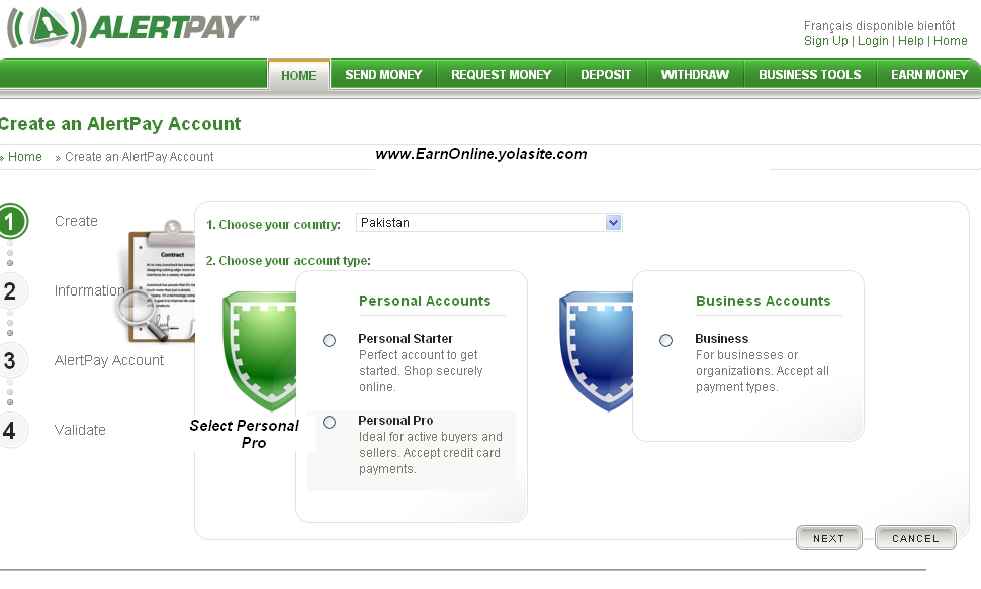
- On the new page you have to select your country, and the type of account you want to create. There are 3 types of account-
- PERSONAL Starter: It is the perfect account to get started, send and
receive money from friends, family and other payments for FREE. Personal
Starter accounts do not have selling tools, but do have easy funding and
withdrawal methods.
- PERSONAL PRO: There are no receiving limits. You can accept credit card payments and also will have access to features like: Mass Pay (send out payments to groups of people), Integration tools and website payment methods (Buy Now Buttons, Subscriptions and Recurring Payments). Receiving fee is 2.5% + $0.25 per transaction. If you are an active seller or you an avid online shopper, choose the AlertPay Personal Pro account.
- BUSINESS Account: It is tailored to meet all the needs of your online
business. If you are managing a business under your business name, this
is the account for you. You will have access to numerous online business
tools to help your business grow online and you will have unlimited
emails associated with your account.
For beginners we suggest the "Personal Pro" account as it is the only account type where members can receive payments without any fee which will help beginners to get started and also it can be upgraded anytime you want. After selecting the "Personal Starter" type click "Next"
- Fill the form with your personal data (Use real valid information or you may face trouble to use your account).
- After filling the form with all the necessary data click "Next"
- On the next page there will be a new form to fill with the details of our account data. These data will be essential for the safety and maintenance of your account.
- Fill the
alertpay account form. When you are on "Third Party" point, just
select "No" .
- After filling all the required information enter the captcha words, Check mark"I agree to Alertpay's User Agreement" and click the "REGISTER" button.
- If you did everything as explained then will be redirected to the confirmation page
- Check your email, you will shortly receive an email to confirm the email address
After this
Final procedure can start using your new account to pay or receive money from
the Internet, just give your AlertPay ID (your Alertpay E-mail Address is
your Alertpay ID) whenever you register on a program which make/receive
payments by AlertPay.

